- Apr 15, 2025
Tech Tip Tuesday: Classroomscreen.com
- Bea Gonzalez
- 0 comments
Your New Favorite Classroom Management Tool
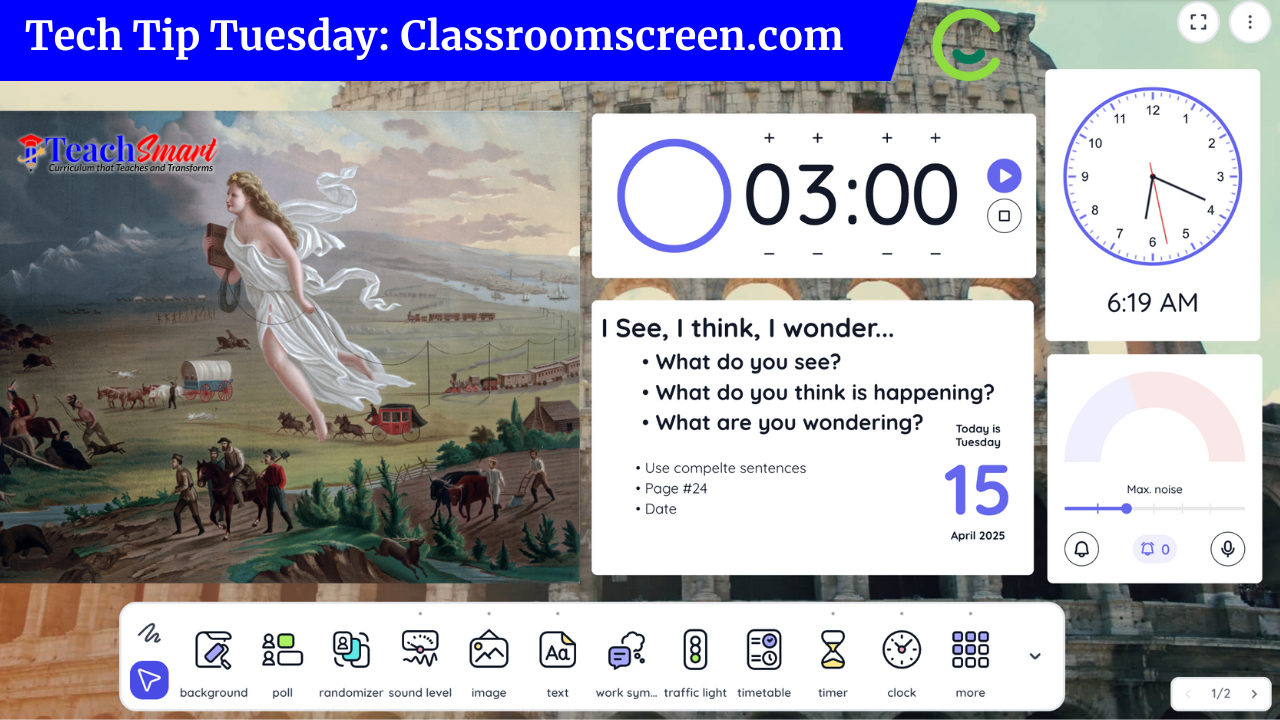
If you're looking for a way to streamline classroom routines and boost student focus, you’ve got to check out ClassroomScreen.com. This free (and user-friendly!) tool brings your go-to classroom management features into one spot—projected right on your board.
🛠️ What You Can Do with ClassroomScreen:
Display a timer ⏱️ for transitions or independent work time
Add a noise level monitor 🎤 to manage volume without nagging
Use random name pickers 🙋♂️🙋♀️ for participation and equity
Post clear learning objectives or instructions 📋
Use built-in widgets like traffic lights, work symbols, and QR code generators
🎯 Why Teachers Love It:
It simplifies your day, keeps kids on track, and supports classroom expectations—all without flipping between apps or tabs. Whether you're teaching in-person or online, ClassroomScreen gives you a visual anchor for your classroom routines.
✨ Try this: Start your next lesson with a timer, work symbol, and your agenda displayed using ClassroomScreen. Watch your transitions get tighter and student engagement rise.